Episode 4: Storing data locally

Julien Truffaut
9 October 2025
In the previous episode, we fetched amulets from the DofusDB API and proved that we could parse them into our own model. Before we start scraping the entire Dofus encyclopedia, I want to store a local copy of the data we fetch. That comes with a few nice benefits:
- We avoid putting unnecessary load on the fan-made DofusDB API.
- Working locally is much faster.
- It works offline.
- If DofusDB changes or disappears, we’ll still have the data.
Using Raw JSON
Previously, we defined a nested struct to model the DofusDB response:
struct GetObjectsResponse {
    total: u32,
    limit: u32,
    skip: u32,
    data: Vec<DofusDbObject>
}
The issue is that DofusDbObject must define every field we want to parse, and our model is still evolving. Instead, we can store each entry as raw JSON so we can iterate on the parser without redownloading data every time:
struct GetObjectsResponse {
    total: u32,
    limit: u32,
    skip: u32,
    data: Vec<serde_json::Value>
}
This change doesn’t affect the fetch_amulets logic at all — we’re just deferring parsing until later.
Storing Locally
Now that we have a bunch of JSON documents, where should we keep them? My first thought was PostgreSQL, since it supports JSON columns and I’m comfortable with it. But for now, I want to keep the setup as simple as possible — no databases, no Docker.
So I’ll just store the data directly in the filesystem: one file per object. We can always upgrade later if needed.
use std::error::Error;
use std::fs;
use std::path::Path;

fn save_dofus_db_data(
    objects: &Vec<serde_json::Value>,
    gear_type: GearType
) -> Result<(), Box<dyn Error>> {

    let out_dir = Path::new("dofus_db/data");
    fs::create_dir_all(out_dir)?;

    for (i, object) in objects.iter().enumerate() {
        let file_name = format!("{gear_type}_{i}.json");
        let file_path = out_dir.join(file_name);

        let json_str = serde_json::to_string_pretty(object)?;
        fs::write(file_path, json_str)?;
    }

    Ok(())
}
Let’s break it down
let out_dir = Path::new("dofus_db/data");
fs::create_dir_all(out_dir)?;
This creates the directory dofus_db/data if it doesn’t exist. Since file I/O can fail, we use ? to propagate any errors.
let file_name = format!("{gear_type}_{i}.json");
let file_path = out_dir.join(file_name);
This gives us file names like Amulet_3.json for the 4th entry.
let json_str = serde_json::to_string_pretty(object)?;
fs::write(file_path, json_str)?;
We convert each JSON object to a formatted string and write it to disk — again, both operations can fail, so ? handles that for us.
Wiring It Up
Now, let’s call save_dofus_db_data in main.rs:
use anyhow::Result;
use dofusopti::dofus_db_client::fetch_amulets;
use dofusopti::models::GearType;

#[tokio::main]
async fn main() -> Result<()> {
    let result = fetch_amulets(0).await?;
    save_dofus_db_data(&result.data, GearType::Amulet).unwrap();
    Ok(())
}
And it works! 🎉 The first 10 amulets are now saved locally.
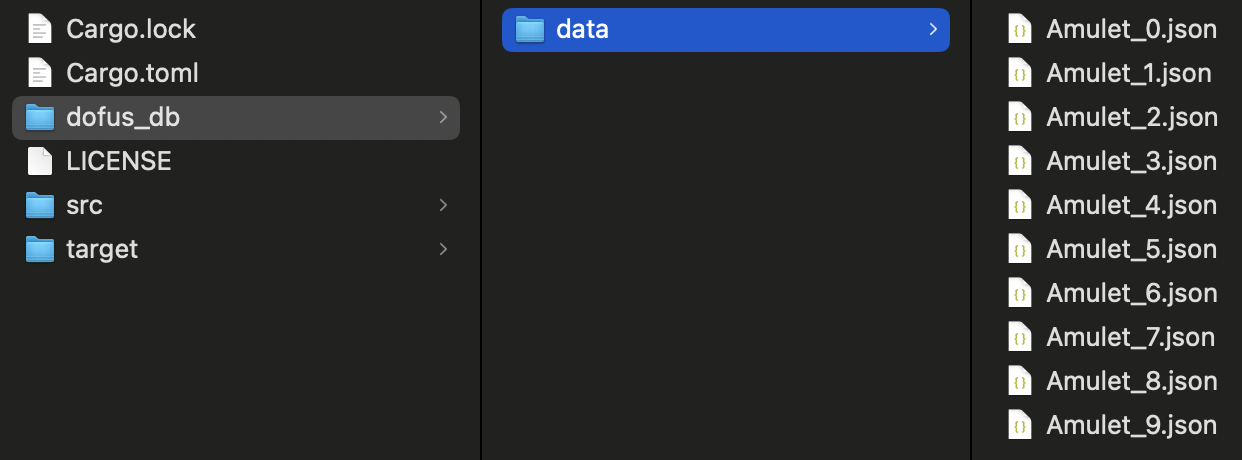
Once again, I’m impressed by how pleasant Rust is to work with. So far, the few compiler errors have been helpful rather than intimidating — they point straight to the problem and often suggest a fix.
What’s Next
Next time, we’ll tackle pagination so we can fetch all items for a given GearType, not just the first batch.
As always, all code from this post is available here.
🧩 Bonus 1: Error Handling
You might’ve noticed I used unwrap() in main.rs instead of ?:
save_dofus_db_data(&result.data, GearType::Amulet).unwrap();When I tried using ?, I got this error:
error[E0277]: `?` couldn't convert the error: `dyn std::error::Error: Sized` is not satisfied
  --> src/main.rs:24:47
   |
24 |         save_dofus_db_data(&result.data, GearType::Amulet)?;
   |         --------------------------------------------------^ doesn't have a size known at compile-time
   |         |
   |         this can't be annotated with `?` because it has type `Result<_, Box<(dyn std::error::Error + 'static)>>`
   |
   = help: the trait `Sized` is not implemented for `dyn std::error::Error`
   = note: the question mark operation (`?`) implicitly performs a conversion on the error value using the `From` trait
   = note: required for `Box<dyn std::error::Error>` to implement `std::error::Error`
   = note: required for `anyhow::Error` to implement `From<Box<dyn std::error::Error>>`
In short: the error type from save_dofus_db_data (Box<dyn Error>) isn’t compatible with the anyhow::Result used in main.
There are several ways to fix it, but the simplest is to make save_dofus_db_data return an anyhow::Result directly:
fn save_dofus_db_data(
    objects: &Vec<serde_json::Value>,
    gear_type: GearType
) -> Result<()> {
That way, ? just works.
Bonus: anyhow::Result also gives us a handy .context() method for more helpful error messages:
fs::write(file_path, json_str)
    .context("Failed to write JSON file")?;
If you want to read more about the ? in Rust, Alex Garella wrote this helpful article.
🏷️ Bonus 2: Better File Names
The current file names (Amulet_3.json) work, but they’re not very descriptive. Let’s use the item’s name instead, with a fallback when it’s missing:
fn get_object_name(object: &serde_json::Value, index: usize) -> String {
    object["name"]["en"]
        .as_str()
        .map(String::from)
        .unwrap_or(format!("unknown_{}", index))
}
Then we clean up the string to make it safe for filenames:
fn create_filename(gear_type: &GearType, object_name: &str) -> String {
    format!("{gear_type}_{object_name}.json")
        .to_lowercase()
        .replace(' ', "_")
        .replace('-', "_")
        .replace("'s", "")
}
Putting it all together:
for (i, object) in objects.iter().enumerate() {
    let object_name = get_object_name(object, i);
    let file_name = create_filename(&gear_type, &object_name);
    let file_path = out_dir.join(file_name);

    let json_str = serde_json::to_string_pretty(object)?;
    fs::write(file_path, json_str)?;
}
Now we get filenames like amulet_ancestral_torc.json — much more readable for Dofus veterans.